> For the complete documentation index, see [llms.txt](https://delivery.ajuda.cc/llms.txt). Markdown versions of documentation pages are available by appending `.md` to page URLs; this page is available as [Markdown](https://delivery.ajuda.cc/geral/pedidos/agendamento-de-pedidos.md).
# Agendamento de pedidos
Quando o agendamento está ativo, sua loja pode receber pedidos para datas e horários futuros escolhidos pelo cliente.
## Como funciona
O comportamento do agendamento depende do status da loja:
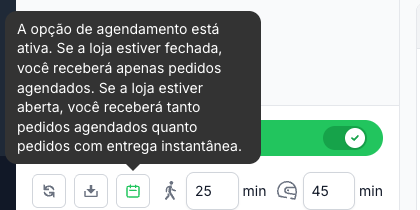
* **Loja aberta** — você recebe tanto **pedidos instantâneos** quanto **pedidos agendados**.
* **Loja fechada** — você recebe **apenas pedidos agendados**.
{% hint style="info" %}
Na barra inferior da tela de Pedidos, o ícone de agendamento (calendário) fica destacado quando o recurso está ativo. Passe o mouse sobre ele para ver o status.
{% endhint %}
Tooltip do agendamento ativo na barra inferior
## Identificando pedidos agendados
Na lista de pedidos, um pedido agendado exibe:
* A **data e faixa de horário** escolhida pelo cliente (ex: "08 de maio, 10:00 - 14:00").
* Um badge indicando quando será a entrega (ex: **Amanhã**).
Ao abrir o detalhe do pedido, a seção **Entrega Agendada** mostra a data e o horário completos.
Detalhe de um pedido com entrega agendada
## Configurar o agendamento
Para ativar, definir dias, horários e limites de antecedência, acesse as configurações:
{% content-ref url="/pages/-MXDr3noB5g5pkRaS8dx" %}
[Agendamento de Entrega](/geral/configuracoes/agendamento-de-entrega.md)
{% endcontent-ref %}